
LUXEA Pro Video Editor 7 Review: Features, Pricing & More

Original price was: $39.$30Current price is: $30.
LUXEA Pro Video Editor 7 is a versatile editing tool ideal for beginners and pros alike. It features advanced editing options, transitions, and audio tools, making it perfect for creating professional-quality videos. Its user-friendly interface allows for easy navigation and creativity.
LUXEA Pro Video Editor 7 is a user-friendly video editing software designed for both beginners and more experienced users. It allows you to create and edit videos by importing various media types, such as video clips, images, and audio files.
The software features a straightforward interface that helps you arrange your clips on a timeline, trim them, and add effects or transitions easily. You can also enhance your videos with built-in tools for text, filters, and music. LUXEA Pro Video Editor 7 supports various export formats, making it easy to share your finished projects on different platforms. Overall, it provides a solid set of tools for anyone looking to produce high-quality videos.

LUXEA Pro Video Editor 7 Key Features
Media Panel & Productivity Tools
- Multi-Monitor Editing: Work across multiple screens to view your project in fullscreen while keeping editing tools accessible.
- Home Screen: Easily start new recordings or access recent projects from a redesigned interface.
- Customizable Workspace: Rearrange and resize panels to suit your workflow for easier editing.
- Keyboard Shortcuts: Utilize default shortcuts or create your own to speed up your editing process.
- Pre-edit Source Files: View and edit files directly from their source before adding them to the timeline.
- Search Your Media: Quickly find files using the new media panel search bar.
- Relink Media: Easily relink moved media files without needing to re-import them.
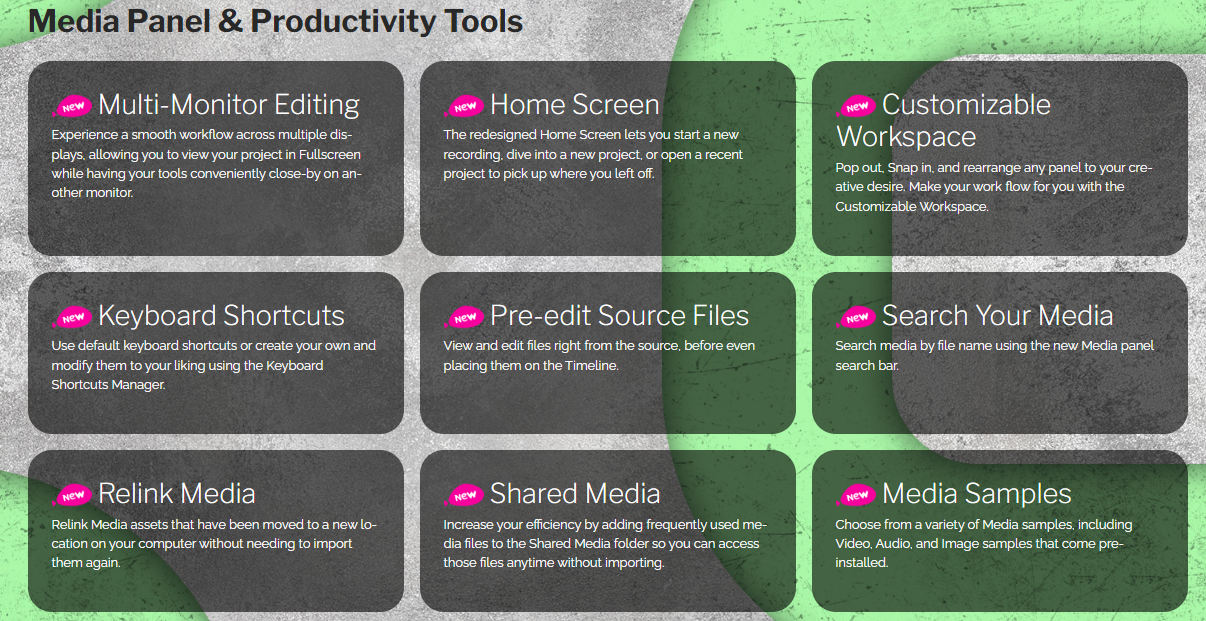
- Shared Media: Store frequently used media in a Shared Media folder for quick access.
- Media Samples: Access pre-installed media samples, including videos and images.
- Improved Image File Support: Supports various image formats like JPEG and TIFF for easy slideshow creation.
- Pack Manager: Manage content and language packs within the app.
- Language Packs: Install LUXEA Pro in multiple languages without needing to reinstall.
- Content Packs: Add creative resources like royalty-free images and audio.
- Organize Media: Sort media by file name, type, or duration for easy management.
- Media Preview: Preview media before adding it to the timeline.
- Video File Support: Supports multiple video formats, including AVI and MP4.
- Audio File Support: Add various audio formats like MP3 and WAV to your projects.
Recording Tools
- Redesigned Recorder Interface: Streamlined design with real-time file size display and video list.
- Auto Stop Record: Set automatic stop based on duration or file size.
- Improved Audio Recording: Record narration directly into your project, visible in real-time on your timeline.
- Improved Mouse/Cursor Effects: Add visual effects to mouse clicks for better audience engagement.

- Screen Recording: Capture your screen at high frame rates with options for audio.
- Targeted Screen Recording: Record specific windows with a single click.
- Single Input Recording: Record audio or video independently.
- Real-time MP4 Creation: Instant encoding as you record for quick editing.
- Webcam Support: Record from your webcam with a customizable viewer.
Editing Tools
- Keyframes: Control media properties like opacity and position using keyframes.
- Masking: Use masks to hide parts of media and feather edges for soft transitions.
- Speed Ramping: Create smooth transitions between slow and fast footage.
- Reverse Speed: Play clips in reverse for creative effects.
- Ripple Edit: Adjust clip speeds without leaving gaps in the timeline.
- Audio Meter: Monitor audio levels visually on the timeline.
- Improved Audio Editing: Control audio levels and apply various effects.
- Improved Captions: Add and style captions for accessibility and translations.

- Limitless Tracks: Layer multiple audio and video tracks for complex projects.
- Green Screen/Chroma Key Support: Remove backgrounds for creative layering.
- Split, Cut, Copy, Paste: Use editing tools to arrange clips efficiently.
- Timeline Markers: Align tracks easily with snap-to-setpoint functionality.
- Timeline Controls: Scale and rotate media quickly within the timeline.
- Rotate Media: Adjust orientation of clips easily.
- Position: Set precise positions for media clips using X and Y values.
- Color Pass: Highlight specific colors while turning the rest grayscale.
- Color LUTs: Apply cinematic LUTs for enhanced color grading.
- Text Tool: Add customizable text in various styles.
- Transitions: Smoothly change between clips with customizable transitions.
- Overlay Effects: Add various effects like snow or light leaks on your media.
- Behaviors: Animate clip entrances and exits for polished videos.
- Motion & Appearance Filters: Apply creative filters for unique visual styles.
- Color & Clarity Filters: Enhance visual quality with various correction options.
- Mosaic Tool: Blur out sensitive information in videos.
- Clip Duration: Control the speed and length of media clips.
- Frame Rate: Support for up to 60 frames per second for smoother playback.
- Blend Mode & Opacity: Experiment with blend modes and opacity for creative effects.
- Watermark Tool: Add a watermark to assert ownership over your content.
- Lock & Hide Tracks: Manage your timeline by locking or hiding tracks easily.
- Dynamic Project Display Area: Preview videos in a customizable area.
Production & Sharing Tools

- Improved Rendering Preview: Preview your project as it renders, with notifications upon completion.
- Tailored Social Media Outputs: Create optimized exports for platforms like YouTube and Vimeo.
- Adaptable Output Options: Customize audio and video parameters, and save templates for future use.
- Produce in 4K: Create high-quality videos in 4K resolution.
- Snapshots: Capture freeze frames or snapshots from your video playback.
- Produce a Selection: Export specific sections of a video for trailers or teasers.
- Export as a GIF: Easily turn videos into GIFs for quick sharing.
- Hardware Acceleration: Benefit from faster processing and rendering with hardware support.
Pricing
LUXEA Pro Video Editor 7 Pricing Plan

User Reviews
Be the first to review “LUXEA Pro Video Editor 7 Review: Features, Pricing & More”
You must be logged in to post a review.

Original price was: $39.$30Current price is: $30.


There are no reviews yet.