
Agile CRM Review: Feature, Pricing & More

Original price was: $49.$9Current price is: $9.
Agile CRM is a cloud-based customer relationship management software that helps businesses of all sizes manage sales, marketing, and customer service activities. It offers features such as contact management, sales tracking, email marketing, social media integration, and analytics. Agile CRM is known for its user-friendly interface, affordable pricing, and flexible customization options.
Agile CRM Review: What Is UpLead?
Agile CRM is an all-in-one software that helps businesses manage their sales, marketing, and customer service in one place. It offers features like contact management, deal tracking, telephony integration, appointment scheduling, and project management to streamline operations. The platform is cloud-based, making it easy to use on mobile devices, and its affordable pricing is ideal for small to medium-sized businesses. Agile CRM also allows enterprises to integrate over 500 apps, and its gamification feature motivates teams by adding a competitive element to sales. With modern tools and great support, it’s a complete solution for improving business efficiency.

Agile CRM Key Feature
Agile CRM offers a wide range of features, organized into distinct categories to streamline business operations. These categories include Sales, Marketing, Service, Productivity, and 500+ App Integrations. Each category contains various tools designed to enhance different aspects of your business. Below is a detailed breakdown of each feature category.
Category 1: Sales Features
Agile CRM’s Sales Features provide a robust set of tools designed to optimize every aspect of the sales process. Here’s a more detailed breakdown of each feature:

- Sales Essentials & 360° Contact View: Sales Essentials offers the core tools needed for managing the sales process. The 360° Contact View provides a detailed profile for each contact, displaying communication history, social media interactions, and purchase behavior, enabling sales teams to gain a complete understanding of customer needs and preferences, which helps in closing deals faster.
- Contact Management & Calendar: With Contact Management, you can store and organize leads, prospects, and customer details all in one place. It includes detailed tracking of every interaction, helping you maintain personalized communication. The Calendar feature allows you to schedule meetings, track events, and send automated reminders, ensuring that you stay on top of follow-ups and appointments, and preventing missed opportunities.
- Documents & Deals: The Documents feature allows for easy uploading, sharing, and managing of sales-related files such as contracts, brochures, and reports. The Deals feature tracks each sale’s progress, offering a visual pipeline with stages and milestones, ensuring every deal moves smoothly from lead to close, with real-time updates and notifications.
- Inbox CRM & Mobile CRM: Inbox CRM integrates your email with the CRM system, letting you send, receive, and track emails without switching between platforms. It also keeps email threads organized by contact. Mobile CRM provides full access to Agile CRM’s features on smartphones and tablets, enabling you to manage your sales pipeline, check contact details, and close deals while on the go.
- Integrations & Collaboration: Agile CRM integrates seamlessly with over 500 apps, including Google Workspace, MailChimp, and social media platforms, allowing you to extend its functionality based on your specific needs. Collaboration is enhanced through Team Chat, enabling real-time communication between team members, and making it easier to collaborate on deals, share updates, and discuss strategies.
- Email Client Software & Sales Enablement: The integrated Email Client Software allows you to send personalized emails, automate follow-ups, and track email performance metrics like opens and clicks. Sales Enablement equips your team with tools like email templates, content libraries, and analytics, ensuring they have the resources needed to engage prospects effectively and nurture leads through the pipeline.
- Lead Scoring & Appointment Scheduling: Lead Scoring helps prioritize leads by assigning scores based on behavior, demographics, and engagement, allowing sales teams to focus on high-potential prospects. Appointment Scheduling automates the booking process by enabling clients to book meetings through a shared calendar, with automatic invites, reminders, and follow-ups, ensuring seamless coordination.
- Gamification & Project Management: Gamification adds a competitive edge to sales by setting goals, tracking performance, and offering rewards for achievements, fostering a motivated sales environment. Project Management offers drag-and-drop task lists, timelines, and milestones, helping you manage not just individual sales but larger projects related to sales and customer success, ensuring timely delivery.
- Lead Prospector & CRM Reporting: Lead Prospector automates the search for potential clients by scouring the web and social platforms, making lead generation faster and more efficient. CRM Reporting provides detailed analytics on sales performance, including conversion rates, sales cycle length, and team performance, helping managers make informed decisions and adjust strategies.
- eDocs & Proposals & Document Signing: With eDocs & Proposals, you can create and send professional proposals directly from the CRM. The system tracks when documents are opened, allowing you to follow up accordingly. Document Signing streamlines the contract signing process, allowing clients to sign electronically, speeding up deal closure, and reducing paperwork.
- Email Finder & Telephony: The Email Finder feature helps you locate valid email addresses for leads, improving outreach efforts and ensuring your sales team connects with the right people. Telephony offers features such as Inbound CTI (Computer Telephony Integration), which links calls to customer records, Auto Dialer to automate outbound calling, Voicemail Drops to leave pre-recorded messages, Call Recording for quality assurance, and Call Scripts to guide sales reps through conversations. Post-Call Automation allows you to automate follow-ups and logging tasks after each call.
- Video Conference & Virtual PBX: The Video Conference feature enables remote meetings with clients and team members, supporting high-quality video calls within the CRM. Virtual PBX provides a cloud-based phone system, offering features like call routing, virtual extensions, and advanced call handling, ensuring professional communication with clients over the phone.
Category 2: Marketing Features
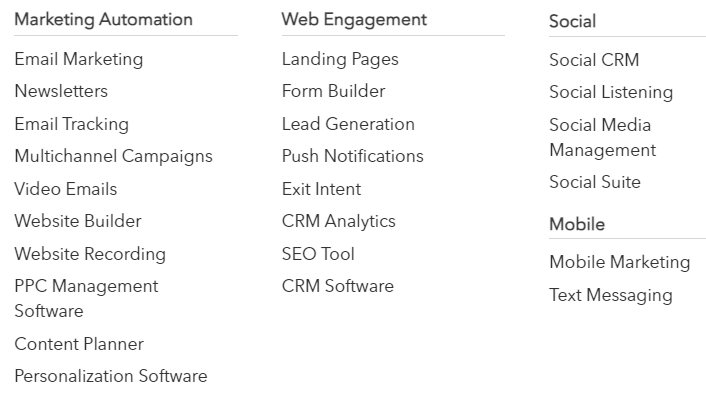
- Email Marketing: This feature allows businesses to design, send, and manage email campaigns with ease. It supports automation, sending emails based on user behavior, and segmentation for more personalized communication, driving better engagement and conversions.
- Newsletters: This feature helps businesses create visually appealing newsletters with customizable templates. It allows companies to regularly communicate updates, promotions, and news to their subscriber base, keeping audiences engaged and informed.
- Email Tracking: With email tracking, businesses can monitor the performance of their campaigns by tracking opens, clicks, and conversions, enabling them to adjust strategies for better engagement.
- Multichannel Campaigns: This feature enables businesses to run campaigns across multiple platforms, such as email, SMS, and social media, ensuring a cohesive strategy that reaches a wider audience, boosting visibility and response rates.
- Video Emails: The video emails feature allows you to include video content directly in your emails, creating a more interactive experience that increases engagement and drives higher click-through rates.
- Website Builder: This tool provides an easy-to-use drag-and-drop editor, allowing users to build professional websites without needing coding skills. It comes with customizable templates and the ability to track visitor interactions for better engagement insights.
- Website Recording: This feature tracks and records user interactions on your website, offering insights into visitor behavior, which helps businesses optimize the user experience and identify areas for improvement to increase conversions.
- PPC Management Software: This tool helps businesses manage their pay-per-click campaigns, optimizing keywords, ad performance, and budget. It provides analytics and reporting tools to ensure you maximize your advertising return on investment (ROI).
- Content Planner: The content planner helps businesses organize, schedule, and track their content across various platforms, ensuring a consistent and timely content strategy that aligns with business goals.
- Personalization Software: This feature customizes website content and marketing messages based on user behavior and preferences. By tailoring the experience to each visitor, it improves engagement and conversion rates.
- Web Engagement: Web engagement tools allow businesses to interact with visitors through pop-ups, live chat, or personalized messages. This feature helps increase engagement, collect leads, and improve conversion rates on the website.
- Landing Pages: The landing page feature enables businesses to create custom, high-conversion pages that are designed to capture leads and drive specific actions. These pages can be aligned with campaigns and include forms and call-to-action buttons.
- Form Builder: The form builder allows businesses to create and customize forms for lead generation, surveys, or feedback collection. These forms can be embedded on websites and landing pages to gather valuable user information.
- Lead Generation: This feature helps businesses attract and capture leads through various methods, including forms, landing pages, and targeted marketing efforts. It ensures a steady flow of potential customers for the sales pipeline.
- Push Notifications: With push notifications, businesses can send real-time messages to users, even when they’re not on the website. This feature helps drive users back to the site and increases engagement with timely offers or updates.
- Exit Intent: This technology detects when a visitor is about to leave your site and triggers a pop-up or message to retain them, encouraging them to take action before they exit, thus reducing bounce rates and increasing conversions.
- CRM Analytics: CRM analytics provide businesses with deep insights into customer behavior, sales performance, and marketing effectiveness. This helps businesses make data-driven decisions to improve customer relationships and optimize sales strategies.
- SEO Tool: This tool helps businesses improve their search engine rankings by offering keyword optimization, content recommendations, and backlink strategies, driving more organic traffic to their website.
- CRM Software: The CRM software manages customer interactions by organizing contact information, tracking communication history, managing leads, providing a streamlined sales process, and improving customer relationships.
- Social CRM: Social CRM integrates social media activity into your CRM, allowing businesses to track customer interactions on platforms like Facebook, Twitter, and LinkedIn, providing a more comprehensive view of customer behavior.
- Social Listening: Social listening tools monitor mentions of your brand, competitors, or industry topics across social media channels, helping businesses stay aware of trends, customer sentiment, and market developments.
- Social Media Management: This feature allows businesses to schedule, publish, and manage posts across multiple social media platforms. It helps ensure a consistent brand presence and track engagement with audiences.
- Social Suite: The social suite consolidates multiple social media management tools into one platform, making it easier for businesses to post, track, and analyze their social media efforts from a single dashboard.
- Mobile Marketing: This tool enables businesses to reach their audience through mobile channels such as SMS, mobile apps, and push notifications, ensuring customers are engaged even when on the go.
- Text Messaging: Text messaging allows businesses to send SMS messages directly to their customers, providing a fast and direct line of communication for marketing campaigns, reminders, or support. It’s an effective way to reach customers with time-sensitive information.
Category 3: Service Features
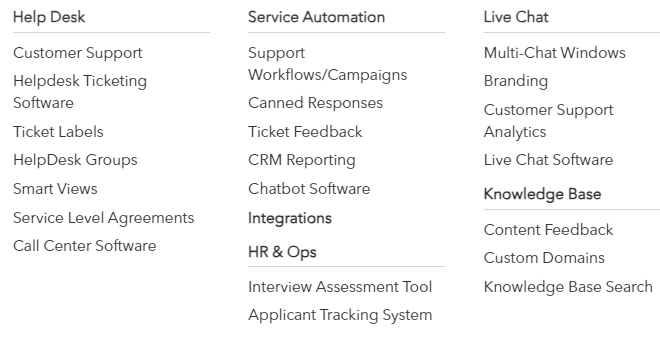
- Help Desk: This feature provides a centralized system for managing and organizing customer queries, ensuring efficient handling of requests and improving response times.
- Customer Support: It offers tools to handle customer issues across multiple channels, helping businesses deliver prompt, reliable, and consistent support.
- Helpdesk Ticketing Software: This system helps in logging, tracking, and resolving customer issues by converting support requests into tickets. It organizes queries by priority and category, streamlining the customer support process.
- Ticket Labels: Labels allow businesses to categorize and prioritize tickets, helping agents easily identify the nature and urgency of issues for faster resolution.
- HelpDesk Groups: This feature enables the division of customer service teams into specialized groups to handle different types of issues, improving workflow efficiency and expertise in resolving specific problems.
- Smart Views: Smart Views offer customizable, filtered views of tickets based on specific criteria, such as status, priority, or agent assignment, ensuring that support agents focus on high-priority tasks.
- Service Level Agreements (SLAs): SLAs define the time frame within which customer issues must be addressed, helping businesses maintain consistent service quality and meet customer expectations.
- Call Center Software: This tool supports customer service through phone channels, providing call routing, management, and performance analytics to enhance customer interactions over the phone.
- Service Automation: Automation helps streamline repetitive customer support tasks, such as ticket assignments and follow-ups, freeing agents to focus on more complex queries.
- Support Workflows/Campaigns: Workflows and campaigns automate specific support processes, such as customer onboarding or troubleshooting sequences, ensuring consistency and saving time for both agents and customers.
- Canned Responses: This feature provides pre-written responses for common inquiries, enabling agents to reply quickly and consistently while reducing response time for frequently asked questions.
- Ticket Feedback: Collect feedback directly from customers on their ticket resolution experience, allowing businesses to evaluate support performance and identify areas for improvement.
- CRM Reporting: CRM reporting offers insights into customer interactions, ticket resolution times, agent performance, and overall support efficiency, helping businesses monitor and improve their support services.
- Chatbot Software: Chatbots handle basic customer queries automatically, offering 24/7 support and reducing the workload on human agents by resolving common issues.
- Integrations: This feature allows the helpdesk to integrate with other business tools, such as CRMs, marketing platforms, or project management systems, to provide a seamless flow of information and improve overall operations.
- HR & Ops: This set of tools focuses on streamlining HR and operational workflows, such as recruitment, assessments, and employee management.
- Interview Assessment Tool: This tool helps HR teams create and manage interview assessments, providing a consistent and structured way to evaluate job candidates.
- Applicant Tracking System: The applicant tracking system (ATS) helps manage the recruitment process by organizing candidate information, tracking application status, and automating communication with applicants.
- Live Chat: Live chat enables real-time customer support through your website or app, providing instant assistance and reducing response times for customer queries.
- Multi-Chat Windows: Support agents can handle multiple live chat conversations simultaneously, allowing for higher productivity and quicker customer service.
- Branding: This feature allows businesses to customize the appearance of their live chat and support platforms to match their brand identity, ensuring a cohesive customer experience.
- Customer Support Analytics: Provides in-depth data and insights on customer support performance, including ticket resolution times, customer satisfaction scores, and agent productivity, helping businesses identify areas for improvement.
- Live Chat Software: The live chat software connects customers with support agents in real-time, helping resolve issues quickly and providing direct, personal interaction.
- Knowledge Base: A knowledge base offers customers self-service options by providing a repository of articles, FAQs, and guides, enabling them to find solutions to their problems without contacting support.
- Content Feedback: Collect feedback on knowledge base content to improve the quality and accuracy of help articles, ensuring customers get the most relevant and useful information.
- Custom Domains: Businesses can host their knowledge base on a custom domain, offering a professional look and feel while aligning with their branding.
- Knowledge Base Search: A search function helps customers quickly find the information they need within the knowledge base, improving the self-service experience and reducing the load on customer support teams.
Category 4: Productivity Features

- RPA Software: Agile CRM’s Robotic Process Automation (RPA) software streamlines repetitive tasks by automating routine processes. This feature helps reduce manual effort, minimize errors, and increase operational efficiency by automating tasks like data entry, email responses, and report generation.
- Application Integration: This feature enables Agile CRM to connect seamlessly with other software applications and tools. By integrating with platforms like email services, accounting software, and marketing tools, it ensures a smooth flow of data and enhances overall productivity by eliminating the need for manual data transfers.
- Business Process Management (BPM): Agile CRM’s BPM tools allow businesses to design, execute, and monitor their processes effectively. This feature helps in optimizing workflows by providing visual process models, tracking performance metrics, and ensuring that all processes are aligned with business goals, leading to improved efficiency and consistency.
- Time Tracking Software: This feature helps businesses monitor and manage the time spent on various tasks and projects. It allows for accurate tracking of billable hours, productivity analysis, and project management, providing valuable insights into how time is allocated and helping optimize resource usage.
- Wireframe Tool: Agile CRM includes a wireframe tool that assists in planning and designing the structure of web pages or applications. This tool provides a visual blueprint, allowing teams to create and review layouts and user interfaces before development begins, ensuring that the design meets user needs and business objectives.
- Screen Capture Extension: The screen capture extension allows users to capture screenshots directly from their browser. This feature is useful for documenting issues, sharing visual information with team members, or including screenshots in reports or support tickets, enhancing communication and efficiency.
Category 5: Agile CRM Apps
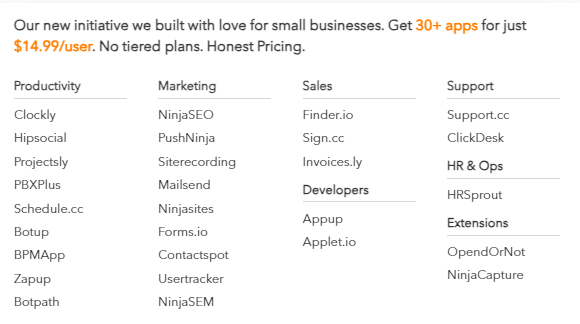
Agile CRM offers access to over 500 apps across various categories to enhance productivity and marketing efforts. For productivity, it includes tools like Clockly for time tracking, Projects for project management, and PBXPlus for call management. Marketing tools such as NinjaSEO for SEO optimization, PushNinja for push notifications, and Mailsend for email campaigns help streamline promotional activities. Additional apps like Hipsocial for social media, Botup for automation, and Forms.io for form creation are also available, ensuring comprehensive support for diverse business needs.
Pricing
Agile CRM Pricing Plans

- Free Plan: Agile CRM’s free plan is suitable for small businesses with basic CRM needs. It includes features like contact management, deals tracking, and email tracking. It allows up to 10 users and 1,000 contacts.
- Starter Plan: The Starter Plan is priced at $8.99/user/month when billed annually, and includes all the features of the Free Plan plus additional features like appointment scheduling, email campaigns, and social media integration. It allows up to 10,000 contacts.
- Regular Plan: The Regular Plan is priced at $29.99/user/month when billed annually, and includes all the features of the Starter Plan plus additional features like lead scoring, marketing automation, and advanced reporting. It allows up to 50,000 contacts.
- Enterprise Plan: The Enterprise Plan is priced at $47.99/user/month when billed annually, and includes all the features of the Regular Plan plus additional features like custom reporting, custom roles and permissions, and advanced integrations. It allows unlimited contacts.
Agile CRM also offers a 14-day free trial for all of their paid plans. To know more about Agile CRM Pricing be sure to check out our informative pricing page.
User Reviews
Be the first to review “Agile CRM Review: Feature, Pricing & More”
You must be logged in to post a review.

Original price was: $49.$9Current price is: $9.


There are no reviews yet.