
Salesflare CRM Review: Features, Pricing & More.
Original price was: $89.$29Current price is: $29.
Salesflare CRM is a cloud-based customer relationship management software that is designed to help businesses streamline their sales processes. The platform is equipped with a range of features, including lead and pipeline management, contact and task management, and email integration. One of the key advantages of Salesflare CRM is its automation capabilities, which can help businesses save time and improve their efficiency.
What Is Salesflare CRM?
Salesflare CRM is a smart customer relationship management tool designed specifically for small and medium-sized businesses. It automates data entry by seamlessly integrating with various platforms, such as email and social media, to capture and organize contact information, interactions, and sales activities.
With features like pipeline management, automated follow-ups, and detailed analytics, Salesflare helps sales teams streamline their workflows and focus on building meaningful relationships with customers. Its user-friendly interface and customization options make it easy for teams to tailor the CRM to their unique needs, ultimately enhancing productivity and driving growth.
Salesflare CRM Key Features
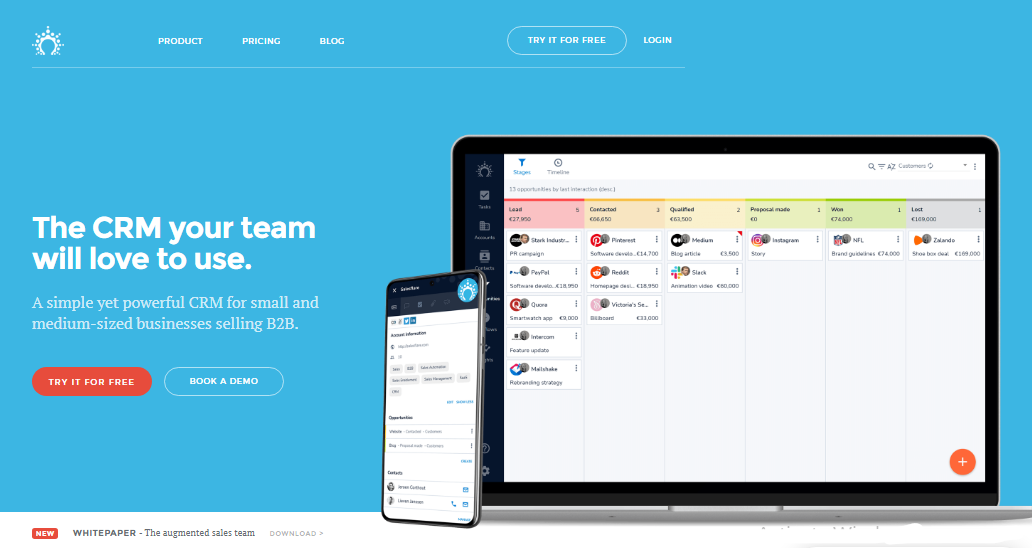
Salesflare CRM is a customer relationship management software that is designed to help businesses streamline their sales processes and improve customer relationships. With a wide range of features, Salesflare CRM helps businesses manage leads, track communication, automate routine tasks, and analyze sales performance.
Some of the key features of Salesflare CRM include contact and lead management, sales automation, communication management, reporting and analytics, and mobile access. By leveraging these features, businesses can maximize sales while minimizing data entry, freeing up time for sales reps to focus on building relationships with their customers.
Maximizing Sales With Minimal Data Entry

Salesflare CRM is a powerful tool for businesses looking to maximize their sales while minimizing data entry. With its intuitive interface and advanced features, Salesflare CRM enables sales reps to streamline their sales processes and focus on building strong customer relationships, rather than spending time on administrative tasks. By automating routine tasks such as lead scoring, email tracking, and appointment scheduling, Salesflare CRM frees up time for sales reps to focus on more important tasks.
Here We give some points for Maximizing Sales with Minimal Data Entry
Automated Contact and Company Information

One of the key features of Salesflare CRM is its automated contact and company information-gathering capabilities. Salesflare CRM automatically gathers contact and company information from various sources such as emails, email signatures, and social profiles, eliminating the need for sales reps to manually store and search for this information.
This saves time and ensures that the contact and company information in the CRM is always up-to-date and accurate. Salesflare CRM also integrates with LinkedIn, allowing sales reps to view LinkedIn profiles directly from the CRM, further simplifying the sales process. Overall, Salesflare CRM’s automated contact and company information-gathering capabilities streamline the sales process and enable sales reps to focus on building relationships with their customers.
Finding Email Addresses Made Easy

One of the key features of Salesflare CRM is its ability to find email addresses for contacts based on their first name, last name, and company. This feature eliminates the need for manual searches or guesswork, allowing sales reps to quickly and easily reach out to potential customers.
Salesflare CRM uses a sophisticated algorithm to search through a vast database of contacts and generate the most likely email address based on the available information. This feature saves sales reps time and ensures that they are reaching out to the right people, increasing the likelihood of a successful sales engagement.
Automate Meeting And Call Logging

Salesflare CRM offers an automatic logging feature that enables sales reps to stop losing time on reporting what they have done. The software connects to their calendar and mobile phones to log meetings and phone calls with customers automatically, saving them time and effort.
By automating the process of logging meetings and phone calls, sales reps can focus on building relationships with their customers and closing deals, rather than spending time on administrative tasks. The feature also ensures that all communication with customers is accurately tracked, making it easy to pick up conversations where they left off and build stronger relationships.
With Salesflare CRM’s automatic logging feature, businesses can also gain valuable insights into their sales process, such as the number of calls and meetings held, the duration of each call and meeting, and the frequency of communication with customers. This information can be used to optimize the sales process and improve customer relationships.
Organize Customer Documents Easily
Salesflare CRM offers a convenient document folder per customer, making it easy for sales reps to organize and access customer documents quickly. The software automatically organizes the documents and other files that sales reps and their teams exchange with customers, saving time and minimizing the risk of lost or misplaced documents.
With Salesflare CRM, sales reps can easily search for and retrieve customer documents, without having to spend time manually organizing and storing them. This feature is particularly useful for businesses that deal with a high volume of documents and need a reliable and efficient way to manage them. By automating the document organization process, Salesflare CRM helps sales reps stay organized and productive while minimizing the risk of errors and oversights.
Effortlessly Follow-up With Customers

Salesflare CRM is a customer relationship management software that offers a wide range of features to help businesses streamline their sales processes and build stronger customer relationships. One of its key features is the ability to effortlessly follow up with customers.
With Salesflare CRM, businesses can easily track their communication history with customers, set reminders for follow-ups, and automate routine tasks such as email tracking and appointment scheduling. This ensures that businesses never miss a follow-up opportunity and can continue to engage with customers in a timely and personalized manner.
Stay on Top of Opportunities

Salesflare CRM provides businesses with a smart overview of all their opportunities, enabling sales reps to stay on top of their sales pipeline and focus on the most important opportunities. The software intelligently brings opportunities to the surface for which action is due and shows the information needed to take that action. This feature allows sales reps to prioritize their tasks and focus on closing deals.
If an opportunity does not require immediate attention, sales reps can decide to follow up later or assign the opportunity to someone else, ensuring that no opportunity falls through the cracks. This feature helps to ensure that all opportunities are properly managed and that sales reps can stay on top of their sales pipeline at all times.
The opportunity management feature of Salesflare CRM is an essential tool for any sales team looking to improve their sales processes and drive business growth. By providing a centralized overview of all opportunities and the information needed to take action, Salesflare CRM helps businesses maximize their sales potential and build stronger customer relationships.
Reacting to Customer Interactions

Salesflare CRM provides businesses with valuable insights into how their customers are engaging with their digital content. The software tracks customer behavior, such as email opens and clicks, website visits, and page views, and stores this information in real time. With this data, sales reps can gain a better understanding of their customers’ interests and preferences, allowing them to tailor their sales strategies accordingly.
For example, if a customer opens an email and clicks on a link to a specific product or service, Salesflare CRM can track this interaction and notify the sales rep. This information can be used to follow up with the customer in a more informed way, highlighting the product or service they expressed interest in.
If a customer visits a business’s website and views certain pages, Salesflare CRM can track this information and provide real-time notifications to the sales rep. This allows the sales rep to follow up with the customer and provide more targeted information or offers based on their interests.
Building Deeper Customer Relationships

Salesflare CRM helps businesses keep track of their customers’ interactions and social media activity by providing a comprehensive view of their customer profiles. This includes tracking the date and nature of the last contact, such as phone calls or email exchanges, to ensure that sales reps are following up with customers in a timely and appropriate manner.
In addition to this, Salesflare CRM also tracks customers’ social media activity, including their tweets, Facebook posts, and other social profiles. By monitoring these activities, sales reps can gain valuable insights into their customers’ interests, preferences, and behavior, allowing them to build deeper and more meaningful relationships.
For example, if a customer tweets about a particular product or service, Salesflare CRM can track this interaction and notify the sales rep. The sales rep can then follow up with the customer and provide more targeted information or offers based on their interests.
Collaborating Effectively As A Team

Salesflare CRM offers a range of features that enable sales teams to collaborate more effectively, allowing them to work together towards shared goals and achieve greater success. By providing a centralized platform for storing customer data and facilitating communication, Salesflare CRM streamlines the sales process and fosters a more collaborative working environment. Salesflare CRM helps sales teams to achieve their full potential and drive business growth.
Improving Customer Communication Collaboration

Salesflare CRM provides a platform for sales teams to collaborate more efficiently on customer conversations. With Salesflare CRM, team members can follow the customer conversations they are involved in without having to be involved in all email communication, phone calls, and meetings.
By sharing an account with team members, sales reps can assign tasks to each other, leave notes and comments on customer profiles, and coordinate their efforts more effectively. This allows team members to work together seamlessly towards a common goal.
For example, if a sales rep has been in communication with a customer and needs to involve another team member, they can share the relevant customer profile with the team member. The team member can then view the conversation history and any notes or comments left by the sales rep, allowing them to understand the customer’s needs and preferences more fully.
Leveraging Connection Insights

Salesflare is a customer relationship management (CRM) software that allows teams to manage their sales pipeline and customer interactions in a centralized platform. One of the features of Salesflare is the ability to visualize the network of team members at each company in the CRM.
This means that when a team member adds a contact or a company to the CRM, Salesflare automatically scans the database to identify other team members who have interacted with that company or contact in the past. Salesflare then displays a network graph that shows the relationships between team members and the companies/contacts they have interacted with.
This network graph can be useful in several ways. For example, it can help team members identify potential connections or introductions that they can make to other team members who have interacted with a particular company or contact. It can also help team members avoid duplicate outreach efforts or conflicting communication with a company or contact that is already being engaged by another team member.
Collaborative Customer Address Book

Salesflare is a customer relationship management (CRM) software that allows teams to manage their customer interactions and sales pipeline in a centralized platform. One of the features of Salesflare is the ability to automatically identify which of the team’s email and phone contacts are customers.
When a team member connects their email and phone accounts to Salesflare, the software automatically scans and analyzes the communication history to identify which contacts are related to customers. Once identified, these customer contacts are added to the team’s central address book within Salesflare.
The central address book provides the team with a single source of truth for customer contact details. Any updates or changes made to customer contact details by one team member will be reflected in the central address book, ensuring that everyone has access to the latest and most accurate information.
Sales Tool Integration

Sales Tool Integration refers to the process of integrating different sales tools and software applications into a centralized platform to streamline sales processes and improve efficiency. In today’s digital age, sales teams rely on a variety of tools and software applications to manage their sales pipeline, customer interactions, and analytics.
Having too many separate tools and applications can create information silos, duplicate data entry, and a lack of collaboration between team members. Sales Tool Integration solves this problem by bringing together different sales tools and applications into a centralized platform, allowing teams to work more efficiently and effectively.
By integrating tools such as CRM software, email automation, lead generation, analytics, and more, sales teams can have a complete view of their sales process and customer interactions. Sales Tool Integration also allows for automation of tasks, such as data entry and follow-up emails, freeing up time for sales teams to focus on high-value activities.
Zapier for Sales Automation

Zapier is a cloud-based automation tool that connects different web applications, allowing for the creation of automated workflows between them. With the Zapier integration, Salesflare users can connect their CRM with over 3000 other apps, including popular tools like Mailchimp, Google Contacts, and Slack.
This integration allows for the automation of tedious and repetitive tasks in the sales workflow. For example, a user can create a “Zap” that automatically adds new leads from a lead generation tool into Salesflare or another Zap that automatically sends follow-up emails to customers after a successful sales call.
The possibilities for Salesflare automation with Zapier are virtually endless, with options to automate tasks such as creating new contact records, updating contact information, sending notifications, and much more. With Zapier, Salesflare users can create customized workflows that meet their specific needs, saving time and increasing efficiency.
Seamless Integrations with Salesflare API

Salesflare’s REST API (Application Programming Interface) is a powerful tool that allows developers to integrate Salesflare with other CRM, ERP, and customer-related systems. With the REST API, developers can exchange data between Salesflare and other applications, enabling seamless integrations and automation.
Using the REST API, developers can retrieve, create, update, and delete various objects and entities within Salesflare, such as contacts, leads, deals, and tasks. This allows for the automation of tasks such as syncing contact and deal information between Salesflare and other systems, streamlining the sales process, and reducing data entry errors.
The Salesflare REST API is easy to use, with extensive documentation and examples available to help developers get started quickly. Within just a few minutes, a development team can start exchanging data with Salesflare and building custom integrations that meet their specific needs.
Developers can also take advantage of Salesflare’s webhooks feature, which allows them to receive real-time notifications when events occur within Salesflare. This enables developers to build custom integrations and automation that are triggered by specific events within Salesflare, such as when a new contact is added or a deal is closed.
Pricing
Salesflare CRM Pricing Plans
Salesflare offers flexible pricing options designed to meet the needs of different businesses, with annual billing providing cost savings compared to monthly plans.
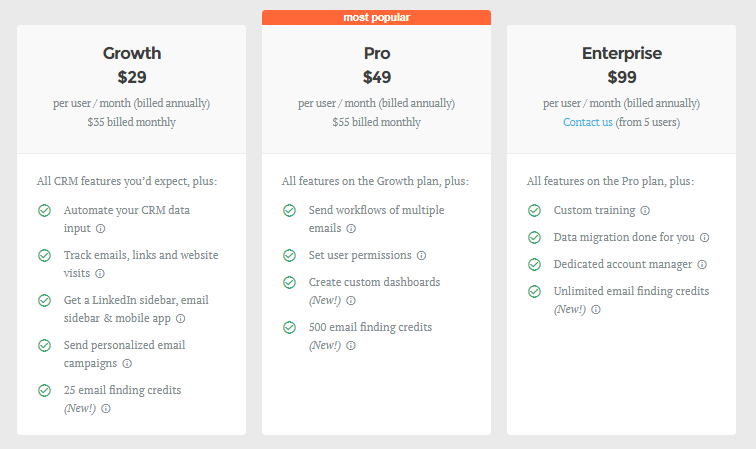
Growth Plan – $29 per user/month (billed annually) or $35 billed monthly
The Growth plan includes all the essential CRM features you would expect, along with the ability to automate data input, track emails, links, and website visits. Users receive a LinkedIn sidebar, email sidebar, and mobile app access. Additionally, this plan allows for sending personalized email campaigns and includes 25 email-finding credits.
Pro Plan – $49 per user/month (billed annually) or $55 billed monthly
The Pro plan is the most popular option and includes all features from the Growth plan, plus the ability to send workflows of multiple emails, set user permissions, and create custom dashboards. It also offers 500 email-finding credits, enhancing users’ outreach capabilities.
Enterprise Plan – $99 per user/month (billed annually)
The Enterprise plan is designed for larger teams and includes all Pro features, along with custom training, data migration assistance, and a dedicated account manager. This plan also provides unlimited email finding credits, allowing for extensive lead generation. For pricing details and arrangements, potential users are encouraged to contact Salesflare directly, with a minimum requirement of five users.
User Reviews
Be the first to review “Salesflare CRM Review: Features, Pricing & More.”
You must be logged in to post a review.

Original price was: $89.$29Current price is: $29.

There are no reviews yet.