
 Rit Sanchita
 In the ever-evolving landscape of customer relationship management (CRM) software, businesses often find themselves at a crossroads, tasked with selecting the right platform to help them thrive. Pipedrive vs. Salesmate CRM — these two names have gained prominence in the CRM sphere, offering solutions designed to empower sales teams and enhance customer relationships. If you’re on the quest to find the perfect CRM for your business, this comprehensive comparison between Pipedrive and Salesmate CRM is your compass.
In this detailed exploration, we’ll delve deep into the realms of features, pricing, and more to help you make an informed choice. Both Pipedrive and Salesmate CRM come armed with their own arsenal of tools, promising to streamline your sales processes and boost your revenue. But as we navigate the nuances of these CRM solutions, you’ll discover that one might be better aligned with your specific business needs. So, fasten your seatbelts, as we embark on a journey to unravel the distinctive attributes of Pipedrive and Salesmate CRM, ultimately guiding you to the CRM that’s right for you.
A Comprehensive Comparison: Pipedrive vs. Salesmate CRM – Finding Your Ideal CRM
Pipedrive vs. Salesmate CRM: User Interface And Ease Of Use Evaluation
When it comes to CRM software, user-friendliness and a seamless interface are paramount. Let’s take a closer look at the user experience of both Pipedrive and Salesmate CRM.
Pipedrive CRM: User Interface And Ease Of Use
Pipedrive is renowned for its intuitive and visually appealing user interface. Navigating through your sales pipeline and managing your sales activities is a breeze. With a clean and organized dashboard, Pipedrive ensures that sales teams can effortlessly track their deals and prioritize tasks. Its user-friendly approach, designed by salespeople for salespeople, contributes to its widespread popularity.
Salesmate CRM: User Interface And Ease Of Use
Salesmate CRM is committed to delivering a user-centric experience. Its interface is known for its simplicity and ease of use. Sales teams can efficiently manage their contacts, deals, and sales activities, making it a suitable choice for those who value straightforward navigation. Salesmate CRM’s design aims to minimize the learning curve, allowing users to adapt quickly and focus on what they do best – selling.
Pipedrive vs. Salesmate CRM: Exploring Comprehensive Features And Functionality
A CRM’s features and functionalities play a pivotal role in enhancing your sales and customer management processes. Here’s an in-depth exploration of what Pipedrive and Salesmate CRM bring to the table.
Features Of Pipedrive:
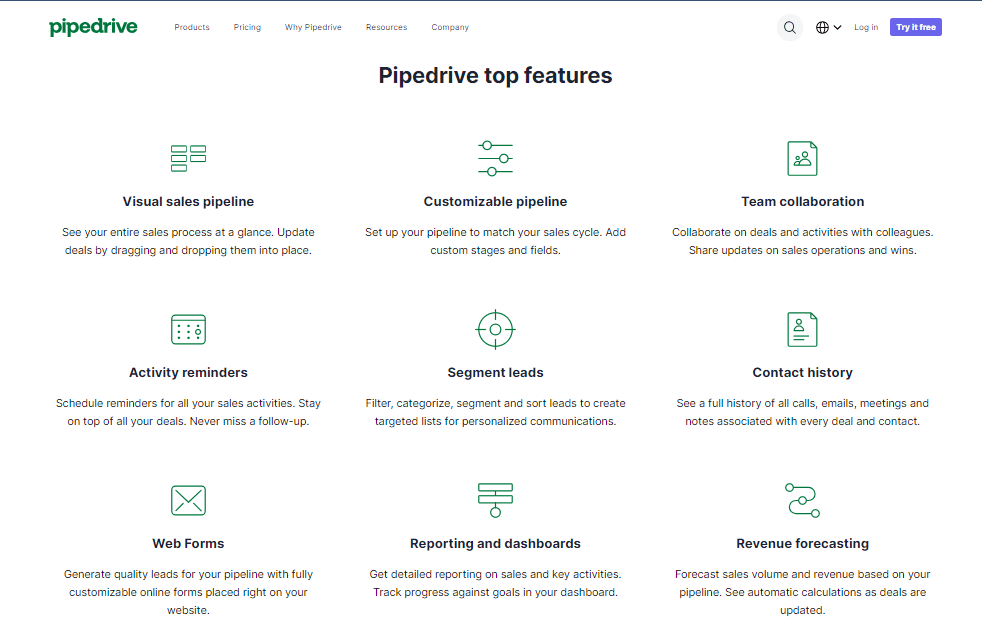
- Visual Sales Pipeline: Pipedrive offers a clear and visual representation of your sales pipeline, providing a comprehensive view of your deals.
- Customizable Pipelines: Tailor your pipelines to match your specific sales cycle by adding custom stages and fields.
- Team Collaboration: Collaborate effectively with your team by sharing updates on sales operations and victories.
- Activity Reminders: Never miss a crucial follow-up with Pipedrive’s activity reminders, helping you stay on top of your deals.
- Lead Segmentation: Categorize, filter, segment, and sort your leads to create targeted lists for personalized communications.
- Contact History: Access a complete history of calls, emails, meetings, and notes associated with every deal and contact.
- Online Lead Generation: Generate quality leads for your pipeline with customizable online forms embedded on your website.
- Robust Reporting: Get detailed reports on sales activities and performance to track progress against your goals.
- Revenue Forecasting: Predict sales volume and revenue based on your pipeline, with automatic calculations as deals are updated.
- Multiple Pricing Plans: Pipedrive offers a range of pricing plans, including Essential, Advanced, Professional, Power, and Enterprise, to cater to businesses of all sizes.
Features Of Salesmate CRM:
- Built-in Calling & Texting: Salesmate CRM offers industry-leading built-in calling and texting capabilities, available in over 90 countries, eliminating the need for separate calling software.
- 360° Customer View: Gain a holistic view of customer interactions across all touchpoints, empowering your team with up-to-date context about each customer, account, and deal.
- Sales Automation: Automate sales and engagement processes, including lead routing, task creation, personalized greetings, and more.
- Lead Assignment: Assign leads efficiently to the right team members to streamline your sales processes.
- Activity Automation: Automate repetitive tasks and build reusable sales playbooks and cadences, turning your sales team into a revenue-generating machine.
- Insightful Reports: Access comprehensive insights into your sales pipeline and team’s performance with built-in intelligence.
- Custom Dashboards: Create custom dashboards to monitor your sales goals and get actionable insights.
- Sales Forecasting: Predict sales figures and track sales goals with Salesmate CRM’s sales forecasting feature.
- Goal Tracking: Stay on top of your sales targets with goal-tracking capabilities.
- Flexible Pricing Plans: Salesmate CRM offers versatile pricing plans, including Starter, Growth, Boost, and Enterprise, accommodating businesses at different growth stages.

Pipedrive vs. Salesmate CRM: Sales And Pipeline Management Comparison
Effective sales and pipeline management are fundamental to the success of your CRM. Pipedrive and Salesmate CRM have their unique approaches to these critical aspects.
Sales And Pipeline Management With Pipedrive:
Pipedrive excels in providing a visual and customizable sales pipeline. The platform allows you to see your entire sales process at a glance, with the flexibility to add custom stages and fields to align with your sales cycle. Collaboration among team members is effortless, as you can share updates and monitor sales operations in real-time. Activity reminders ensure you stay on top of all your deals, making sure you never miss an important follow-up. Pipedrive’s lead segmentation features also help filter and categorize your leads for targeted personalized communications.

Sales And Pipeline Management With Salesmate CRM:
Salesmate CRM provides a visual sales pipeline to help you stay on top of your deals and track progress. It offers email and calendar synchronization, allowing you to do sales management activities seamlessly. Call recording and account management further enhance the sales and pipeline management experience. Salesmate CRM aims to free your sales team to focus on selling, thanks to its contact and deal-tracking capabilities. This CRM approach centers around providing the clarity and context needed to close deals effectively.

Stay with us on this CRM exploration journey as we continue to evaluate Pipedrive vs. Salesmate CRM in terms of pricing, scalability, security, user insights, industry-specific features, onboarding, and more.
Pipedrive vs. Salesmate CRM: Analyzing Pricing Plans And Features
In the realm of CRM solutions, understanding pricing plans and features is vital to making an informed choice. Join us as we dissect and compare the pricing plans and features of Pipedrive and Salesmate CRM, helping you navigate the path to your ideal CRM solution.
Pipedrive Pricing Plans And Features
Exploring Pipedrive’s pricing options is crucial to finding the right fit for your CRM needs. Here, we’ll dissect Pipedrive’s pricing plans and the features they offer, helping you make an informed decision for your 2024 CRM requirements.
- BasicCRM ($30/month, Billed Annually): Priced at $30 per month when billed annually, the BasicCRM plan serves as an affordable entry point into Pipedrive. It equips users with essential features for effective CRM management. With this plan, you’ll enjoy unlimited customizable pipelines, contacts, and boards, offering the flexibility needed to manage your sales processes. Templates for lead, contact, and deal management streamline your workflow, while the iOS and Android apps ensure accessibility on the go. Additionally, you can create a dashboard based on one board, simplifying data visualization.
- StandardCRM ($42/month, Billed Annually): Stepping up to the StandardCRM plan, priced at $42 per month when billed annually, grants you access to advanced account, contact, and deal management tools. The plan includes two-way email integration with Gmail and Outlook, enhancing communication and organization. It also features robust activity management to keep you on top of important tasks. The ability to create quotes and invoices streamlines your sales processes, while the capability to merge duplicate data makes data management easier. Moreover, the plan includes custom CRM automation, allowing up to 250 actions per month, as well as custom CRM integrations. You can create a dashboard that combines up to five boards, offering a comprehensive overview of your operations.
- Pro CRM ($72/month, Billed Annually): Pipedrive’s Pro CRM plan, priced at $72 per month when billed annually, takes your CRM capabilities to the next level. It introduces features like sales forecasting to help you make informed decisions. Email templates with custom parameters streamline communication, and email tracking and automation improve engagement. Mass emails enable effective audience outreach. Google Calendar sync keeps your schedule in check, while sales analytics provide valuable insights. You can also create customizable email signatures. With this plan, you get custom CRM automation, offering up to 25,000 actions per month, as well as custom CRM integrations. Additionally, you can create a dashboard combining up to 10 boards for in-depth analysis and control.
- EnterpriseCRM (Contact Sales of Monday.com for Price): The EnterpriseCRM plan is tailored for businesses with extensive CRM requirements. For pricing details, it’s advisable to contact Pipedrive’s sales team directly. This plan offers advanced features such as lead scoring, team goals, and advanced analytics, with dashboards supporting up to 50 boards. It includes account management and document handling for sales processes. Enterprise-scale automation and integrations provide efficiency and flexibility. Pipedrive prioritizes security with enterprise-grade measures and governance. Multi-level permissions ensure that access is controlled, and HIPAA compliance is maintained where necessary.
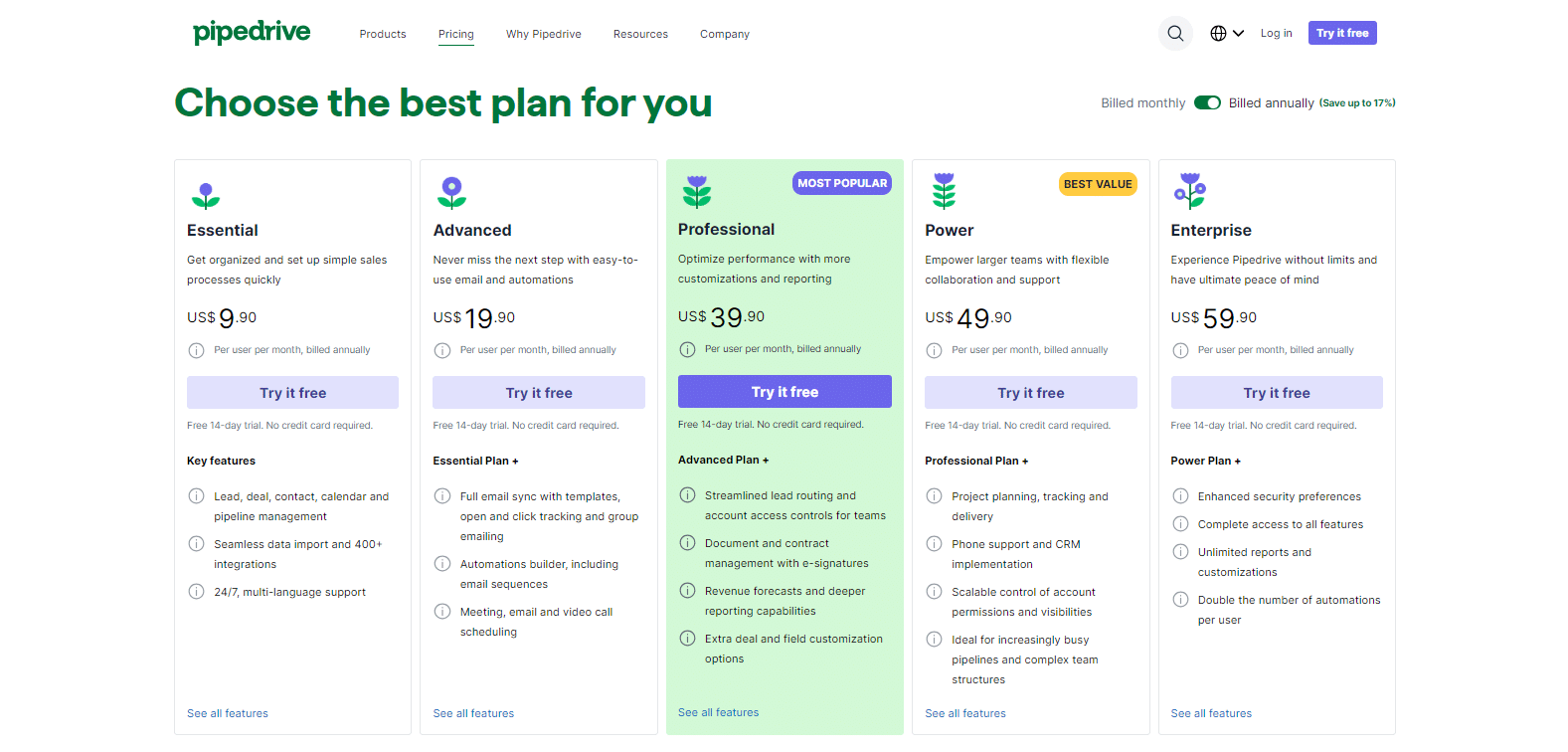
By examining these pricing plans and their features, you can determine which Pipedrive plan aligns best with your business objectives, ensuring that you make an informed choice for your CRM solution. Please note that pricing details for the EnterpriseCRM plan are available by contacting Pipedrive’s sales team directly.
Salesmate CRM Pricing Plans And Features
Salesmate Pricing plans are tailored to accommodate businesses of varying sizes and CRM requirements. Let’s delve into these plans and the features they encompass:
- Starter ($12/user/month): At an affordable price of $12 per user per month, the Starter plan equips you with essential CRM features to kickstart your CRM journey. This includes robust tools for effective contact management, companies, and deals within the CRM. You’ll also benefit from seamless email synchronization, tracking, and access to email templates for efficient communication. With multiple pipeline management, a standard dashboard, and reporting capabilities, this plan provides the fundamental tools for effective CRM.
- Growth ($24/user/month): For businesses in search of additional CRM functionalities, the Growth plan, priced at $24 per user per month, extends the offerings of the Starter plan. It introduces product management for efficient tracking of products or services and goal management to monitor your team’s performance. Email reminders and scheduling streamline communication, while the team inbox ensures seamless customer interaction. Customization options expand with custom dashboards, date-based workflows, and custom roles. The plan also includes single sign-on (SSO) and Security Assertion Markup Language (SAML) integration for enhanced security.
- Boost ($40/user/month): The Boost plan, priced at $40 per user per month, builds upon the features of the Growth plan and introduces advanced tools to enhance your sales efforts. It offers team management capabilities, enabling efficient oversight of your sales team. Increased team inbox limits accommodate higher volumes of customer inquiries, while the power dialer enhances your sales outreach. Voicemail drop saves time during sales calls, and the smart activity queue optimizes your sales activities. IP restriction adds an extra layer of security, and you gain the capacity for more complex workflows and sequences.
- Enterprise (Custom): For large enterprises with unique and extensive CRM needs, Salesmate CRM offers a custom Enterprise plan. This plan encompasses all the features of the Boost plan and can be tailored to your specific requirements. You’ll benefit from a dedicated account manager, personalized onboarding, priority support, dedicated instances, unlimited dashboards, increased workflow limits, permissions customization, and enhanced sequence capabilities. This level of customization ensures that the CRM seamlessly aligns with your enterprise’s CRM strategy.

Salesmate CRM’s flexible pricing structure empowers businesses to select the plan that best suits their CRM needs. This ensures that both startups and large enterprises can harness the CRM’s capabilities for effective sales and customer relationship management.
Pipedrive vs. Salesmate CRM: Scalability For Business Growth
Scalability and security are vital considerations when choosing a CRM solution. In this comparison between Pipedrive and Salesmate CRM, we’ll explore how these platforms address the scalability needs of businesses looking to grow and ensure the security and privacy of sensitive data. Discover how each CRM platform excels in these crucial aspects.
Scalability With Pipedrive:
When it comes to scaling your business, Pipedrive offers a range of options to accommodate your growth. With different pricing tiers, including the Enterprise plan for extensive CRM requirements, Pipedrive ensures that your CRM system can evolve alongside your business. The ability to add more users, access advanced features, and integrate with third-party apps allows you to expand your CRM capabilities as your organization grows. This scalability helps businesses seamlessly transition from small startups to large enterprises without the need to switch CRM platforms.
Scalability With Salesmate CRM:
Salesmate CRM is designed to support businesses as they grow. With flexible pricing plans, from Starter to Enterprise, it offers scalability options suitable for companies of various sizes. You can easily add new users or access advanced features as your team expands. Additionally, the platform’s integrations and customization capabilities ensure that it can adapt to your evolving CRM needs. This scalability empowers businesses to continue using Salesmate CRM as they transition from startups to large enterprises, maintaining operational efficiency and customer relationship management effectiveness.

Pipedrive vs. Salesmate CRM: Ensuring Security And Data Privacy
Ensuring the security and data privacy of your CRM system is paramount. In this comparison between Pipedrive and Salesmate CRM, we’ll delve into the measures each platform takes to safeguard your valuable information. Discover how these CRMs prioritize security and data privacy to provide you with peace of mind as you manage your business management and customer relationships.
Security Measures With Pipedrive:
Pipedrive prioritizes the security and privacy of your data. The platform employs various measures, including data encryption, secure access controls, and compliance with international standards, to safeguard your information. With the Enterprise plan, you can expect advanced security features, such as multi-level permissions and HIPAA compliance where needed. Pipedrive ensures that your data remains protected, no matter the scale of your business.
Security Measures With Salesmate CRM:
Security and data privacy are paramount for Salesmate CRM. The platform offers enterprise-grade security, with ISO certification and GDPR readiness. Your data is protected through advanced encryption and secure access controls. The platform also provides personalized support to ensure that your security needs are met. Whether you want a small business CRM or a large enterprise CRM, Salesmate CRM makes data protection a top priority, giving you peace of mind when it comes to handling sensitive customer information.
Pipedrive vs. Salesmate CRM: Real User Insights And Ratings
In the realm of CRM software, real user insights and ratings provide valuable perspectives on a platform’s performance and user satisfaction. Here, we’ll delve into the real user experiences and ratings for Pipedrive and Salesmate CRM, shedding light on the strengths and satisfaction levels of these two CRM solutions.
Pipedrive Ratings And User Insights
Pipedrive has garnered positive feedback and ratings from users across various review platforms. On G2, it boasts a commendable rating of 4.2 out of 5, reflecting the high level of user satisfaction with the platform’s features and functionality. Capterra users have given Pipedrive an impressive rating of 4.5, underlining their favorable experiences with the software. TrustRadius users have also expressed their approval, with a solid rating of 8.1/10, highlighting Pipedrive’s effectiveness in meeting their business needs.

Salesmate CRM User Ratings:
Salesmate CRM has received favorable user ratings, signifying its value and user-friendly interface. Users commend its features and usability, with a solid G2 rating of 4.6 out of 5, highlighting its efficiency and positive user experiences. Capterra users are equally satisfied, rating Salesmate CRM at 4.7 out of 5. They appreciate its impact on various industries and its effectiveness in enhancing sales and customer relationship management. TrustRadius users provide Salesmate CRM with a commendable rating of 9.5/10, reflecting their high regard. They highlight its built-in calling and texting features, as well as its ability to offer exceptional customer support.

Pipedrive vs. Salesmate CRM: Tailoring Solutions To Your Industry
Introduction: In the competitive business landscape, tailoring your CRM solution to your industry’s specific demands can be a game-changer. Pipedrive and Salesmate CRM both understand the significance of industry-specific tools. In this section, we’ll explore how Pipedrive and Salesmate CRM address the unique needs of various sectors, from automotive sales to banking and beyond, ensuring that your CRM aligns perfectly with your industry’s requirements.
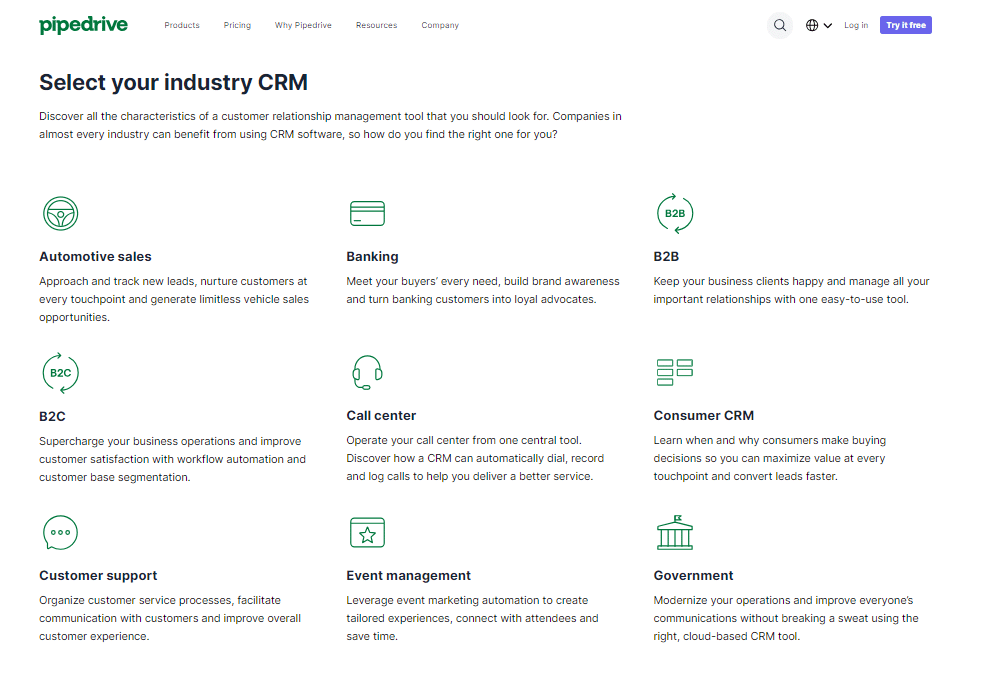
Industry-Specific Features In Pipedrive:
Both Pipedrive and Salesmate CRM recognize the importance of catering to specific industries. In the case of Pipedrive, the CRM offers a range of industry-specific features. These features are designed to align with the distinct needs of various sectors, from automotive sales to banking and more. Discover how Pipedrive tailors its solutions to help businesses in these industries thrive with specialized tools and capabilities.
Industry-Specific Features In Salesmate CRM:
While Salesmate CRM doesn’t limit itself to one industry, it takes a versatile approach to meet the unique demands of various sectors. Explore how Salesmate CRM’s features and integrations can be molded to suit the requirements of your industry, whether you’re in construction, real estate, SaaS, or any other field. See how Salesmate CRM provides the adaptability needed to excel in diverse business environments.

Pipedrive vs. Salesmate CRM: Onboarding And Training For New Users
Introduction: Seamless onboarding and user training are essential for CRM success. Pipedrive and Salesmate CRM prioritize making it easy for new users to adapt to the CRM environment. This section delves into the onboarding processes of both CRMs, highlighting the resources and support available to ensure that your team can quickly become proficient CRM users.
Onboarding And Training With Pipedrive:
Getting started with a CRM is a pivotal step for businesses. Pipedrive streamlines the onboarding process, making it easy for new users to get acquainted with the CRM. Learn about the resources, support, and guidance that Pipedrive offers to ensure that your team can quickly adapt to the CRM and harness its features effectively.
Onboarding And Training With Salesmate CRM:
Salesmate CRM stands out for its user-friendly design, which extends to the onboarding process. Discover how Salesmate CRM supports new users in learning the ropes, ensuring a seamless transition into using the CRM. Explore the training resources and assistance available to help users quickly become proficient with Salesmate CRM.
Pipedrive vs. Salesmate CRM: Real-World Business Impact Through Success Stories
Introduction: Real-world success stories serve as a testament to the effectiveness of a CRM. Pipedrive and Salesmate CRM have left their mark on various businesses. In this section, we’ll explore how both CRMs have made a tangible impact on companies, providing inspiration and practical insights into how you can leverage these CRMs for your own business growth.
Pipedrive Business Success Stories:
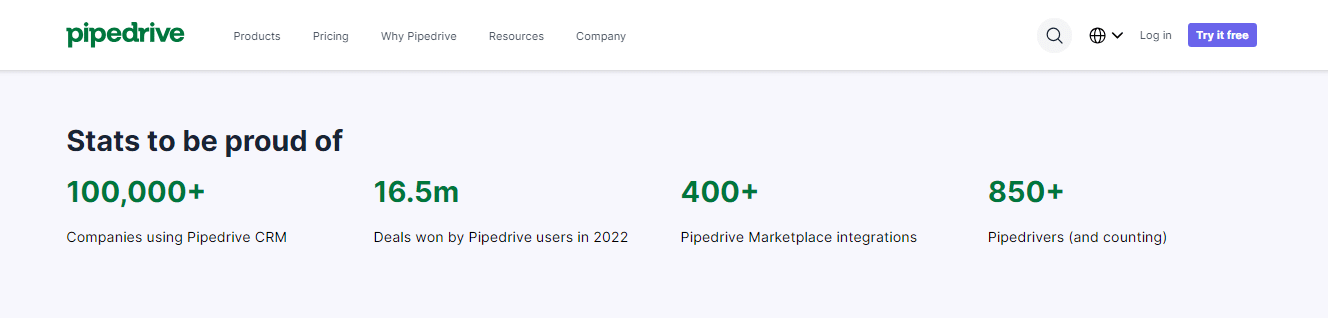
Real-world success stories can provide valuable insights and inspiration for businesses. Dive into examples of how companies have leveraged Pipedrive to achieve their objectives. These success stories illustrate the tangible impact Pipedrive can have on sales, customer relationships, and overall business growth. Learn from the strategies and outcomes of businesses that have successfully utilized Pipedrive.
Salesmate CRM Business Success Stories:
Discover how Salesmate CRM has made a difference for businesses from startups to enterprises. Explore real-world stories of how Salesmate CRM has impacted companies, providing a glimpse into the practical benefits and results that businesses have experienced through their use of the CRM. Gain insights from the success stories of businesses that have harnessed Salesmate CRM for growth and improved customer relationship management.
Pipedrive vs. Salesmate CRM: Understanding Constraints And Limitations
Introduction: No software is without limitations, and it’s crucial to understand these constraints. In this segment, we’ll take a closer look at the limitations and constraints of both Pipedrive and Salesmate CRM, helping you assess how these factors may influence your CRM experience and impact your business operations.
Limitations Of Pipedrive:
Every software has its limitations, and Pipedrive is no exception. In this section, we’ll examine the constraints and limitations of Pipedrive. Understanding these aspects is crucial in making an informed decision about whether Pipedrive aligns with your business requirements and operational expectations.
Limitations Of Salesmate CRM:
Just like any CRM, Salesmate CRM comes with its set of limitations. In this segment, we’ll explore the constraints and limitations of Salesmate CRM, allowing you to assess how they may influence your CRM experience and impact your business operations.
Pipedrive vs. Salesmate CRM: Tailoring Solutions To Your Needs With Customization
Introduction: Customization is key when it comes to making your CRM work for you. Pipedrive and Salesmate CRM offer ample customization options to tailor the CRM to your business’s unique needs. In this section, we’ll explore how both CRMs facilitate customization and development, allowing you to create a CRM system that perfectly aligns with your business objectives and workflows.
Customization And Development With Pipedrive:
Pipedrive offers users the ability to customize and develop the CRM according to their unique needs. In this section, you’ll learn how Pipedrive facilitates the process of customization and development, ensuring the CRM adapts perfectly to your business objectives and workflows. Discover how you can shape Pipedrive to meet your specific needs effectively.
Customization And Development With Salesmate CRM:
Salesmate CRM’s flexibility is exemplified through its customization options. Find out how Salesmate CRM can be customized and developed to create a tailored CRM system that perfectly aligns with your business objectives. This section provides insights into how you can adapt Salesmate CRM to meet your specific needs efficiently.
Pipedrive vs. Salesmate CRM: Expanding Functionality With Third-Party Integrations
When comparing CRM systems like Pipedrive and Salesmate CRM, a critical aspect to consider is their ability to integrate with third-party applications. The seamless connection to other tools can significantly impact the overall efficiency and productivity of your team. Let’s delve into the integrations offered by these two platforms to see how they stack up.
Pipedrive Integrations:
Pipedrive’s robust integration ecosystem is designed to provide users with a wide array of options to extend and enhance their CRM capabilities. From communication tools like Gmail and Outlook to marketing automation platforms such as Mailchimp and HubSpot, Pipedrive offers integrations for various business needs. It also supports integration with project management and collaboration tools like Trello and Asana, streamlining the workflow for sales teams. Accounting and finance integrations with QuickBooks and Xero help in managing financial data effectively. Moreover, the CRM platform seamlessly connects with e-commerce solutions, e-signature tools, and customer support applications, making it adaptable to a wide range of business requirements.

Salesmate CRM Integrations:
Salesmate CRM understands the importance of integrating with other software to deliver an all-encompassing solution. The platform offers integrations with popular email services such as Gmail, Office 365, and Outlook, ensuring that your communication data is centralized and easily accessible. Integration with lead generation tools and web forms enables businesses to capture and manage leads efficiently. Salesmate CRM also connects with productivity apps, document management tools, and e-commerce platforms to provide a comprehensive set of features. It integrates seamlessly with accounting software like QuickBooks and Xero for a more holistic approach to financial management. Overall, Salesmate CRM’s integrations focus on optimizing personalization and automation, aligning with its core strengths.
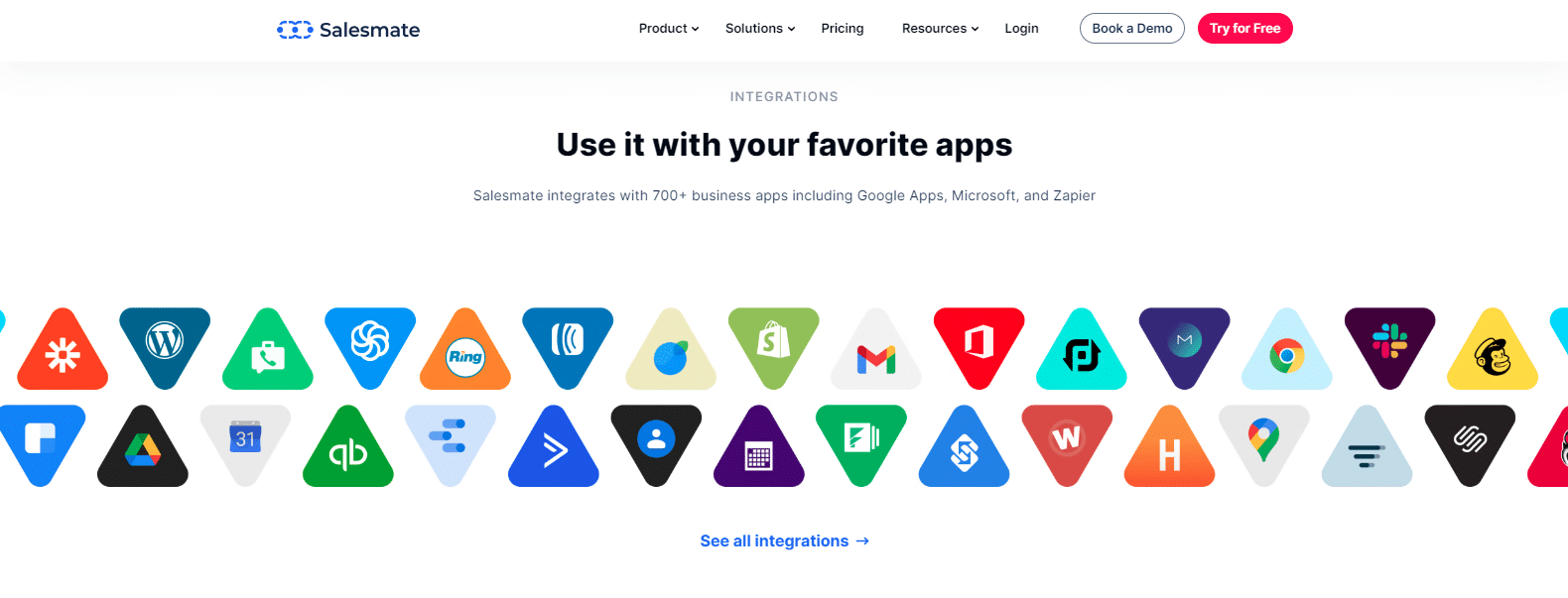
In the realm of CRM software, the ability to integrate with third-party applications is a key factor that can shape your CRM strategy. Both Pipedrive and Salesmate CRM offer a diverse selection of integrations to cater to different business needs. Your choice may depend on your specific workflow requirements and the software tools your team relies on.
Pipedrive vs. Salesmate CRM: Seamless Transition With Data Migration
When considering a switch or upgrade in your CRM software, one of the critical elements is the process of data migration. The efficiency and accuracy of migrating your existing data into the new platform can significantly impact your operations. Here, we’ll examine how both Pipedrive and Salesmate CRM handle data migration to ensure a seamless transition.
Pipedrive Data Migration:
Pipedrive offers a straightforward and user-friendly approach to data migration. Users can conveniently import their existing data from spreadsheets or other CRM platforms. The platform provides step-by-step guidance and tools to map your data fields accurately, ensuring that your information transfers correctly. Pipedrive’s support and resources offer helpful documentation and assistance throughout the migration process. While the complexity of the migration may vary depending on your existing data structure, Pipedrive’s user-centric approach simplifies the transition to the CRM.
Salesmate CRM Data Migration:
Salesmate CRM takes data migration seriously, understanding the critical nature of preserving and transitioning data accurately. The platform provides a dedicated migration service, ensuring that your data is transferred seamlessly. Users are assigned a personal migration consultant who guides them through the process, addressing specific requirements and data mapping. This approach reduces the burden on users and guarantees a smooth transition. Salesmate CRM’s migration team is well-equipped to handle complex data structures, making it an attractive choice for those seeking a hassle-free data migration experience.
In the world of CRM software, a smooth transition is vital to minimize disruption to your operations. Both Pipedrive and Salesmate CRM offer data migration solutions, each with its unique strengths. Your choice may depend on factors such as the complexity of your data and your preference for a DIY approach or a dedicated migration service.
Pipedrive vs. Salesmate CRM: Staying Productive On The Go With Mobile Apps
In today’s fast-paced business environment, staying connected and productive on the go is essential. Mobile apps have become indispensable for sales professionals. Here, we’ll explore the mobile applications provided by Pipedrive and Salesmate CRM to help you make an informed choice.
Pipedrive Mobile App:
Pipedrive’s mobile app is designed to empower sales teams to stay productive no matter where they are. It offers a user-friendly interface that allows you to manage your sales pipeline, access and update contact information, schedule meetings, and track your activities while on the move. The app is available for both iOS and Android devices, ensuring flexibility for users regardless of their mobile platform. With features like offline access and synchronization, Pipedrive’s mobile app offers a seamless experience for field sales representatives.
Salesmate CRM Mobile App:
Salesmate CRM understands the importance of mobility and offers a comprehensive mobile app to support your sales and customer relationship management efforts. The app provides access to contacts, deals, and tasks, enabling you to manage your sales activities efficiently. It also offers calling and texting features for seamless communication with your clients. Available on both iOS and Android, the Salesmate CRM mobile app ensures that you’re always connected. Its user-friendly design and offline capabilities make it an excellent choice for sales professionals who need to stay productive on the go.
In a world where mobility and accessibility are paramount, having a reliable mobile app is crucial for CRM software. Both Pipedrive and Salesmate CRM offer robust mobile applications to cater to the needs of sales teams that are often on the move. Your choice may depend on specific features or the mobile platform that aligns with your preferences.
Pipedrive vs. Salesmate CRM: Conclusion
Choosing the right CRM software for your business is a crucial decision, as it impacts your sales, customer relationships, and overall efficiency. In this comparison of Pipedrive and Salesmate CRM, we’ve explored various aspects of both platforms to help you make an informed choice.
Pipedrive is a well-established CRM system with a focus on helping sales teams streamline their processes. Its user-friendly interface, visual sales pipeline, and customizable pipelines make it an attractive option. Pipedrive’s pricing plans cater to businesses of all sizes, and it offers essential features such as lead segmentation, contact history, and reporting tools. With high user ratings on platforms like G2, Capterra, and TrustRadius, it has proven its value to many businesses.
On the other hand, Salesmate CRM stands out for its emphasis on personalization and automation. It offers a variety of features, including built-in calling and texting, email campaigns, and sales activity tracking. Salesmate CRM is also known for its user-friendly interface, earning high ratings on G2, Capterra, and TrustRadius. Its flexible pricing plans, suitable for businesses at different stages, make it an appealing choice.
Ultimately, the choice between Pipedrive and Salesmate CRM depends on your specific needs. Pipedrive is ideal for those who prioritize visual sales pipeline management and want a well-rounded CRM. Salesmate CRM is a strong contender if you value personalization, automation, and built-in calling features. To make the right decision, consider your business requirements, budget, and the features that align best with your objectives. Both Pipedrive and Salesmate CRM offer the tools you need to enhance sales and customer relationship management, ensuring that you can make a choice that propels your business forward.
Pipedrive vs. Salesmate CRM: FAQs
Can I import my existing data into Pipedrive and Salesmate CRM?
Yes, both Pipedrive and Salesmate CRM offer comprehensive data migration tools, allowing you to seamlessly import your contacts, leads, deals, and other critical information. These tools are designed to simplify the transition process and ensure that no vital data is lost.
What features do these CRMs offer for lead management and segmentation?
Pipedrive and Salesmate CRM excel in lead management and segmentation. They enable you to categorize and segment leads based on various criteria, such as industry, lead source, geographical location, and behavior. These advanced features empower you to deliver highly personalized communication and nurture leads effectively.
Are Pipedrive and Salesmate CRM suitable for my business size?
Pipedrive primarily targets small and medium-sized businesses, while Salesmate CRM is versatile, catering to businesses of various sizes, including startups, small and medium enterprises, and large corporations. The scalability of Salesmate CRM makes it adaptable to your specific business needs.
Do these CRMs offer mobile apps for on-the-go access?
Yes, both Pipedrive and Salesmate CRM offer mobile applications compatible with iOS and Android devices. These apps provide full access to the CRM features, allowing you to manage your sales and customer relationships while on the move.
Can I integrate these CRMs with other software and tools my business uses?
Pipedrive and Salesmate CRM offer a wide array of integrations with popular third-party applications. These integrations include email, marketing, accounting, and productivity software. This flexibility ensures that you can seamlessly connect the CRM systems with your existing tools, creating a unified and efficient workflow.
What kind of customer support is available for users of Pipedrive and Salesmate CRM?
Both Pipedrive and Salesmate CRM provide robust customer support options. They offer email and phone assistance, and their support teams are available to address any inquiries, issues, or assistance you may require. Additionally, knowledge bases, FAQs, and online resources are accessible to aid users with self-help and information.


